
Libreng Videoke App
LaSing Karaoke APK
Turn any Android phone into a videoke machine. Big scrolling lyrics, full offline mode, zero cost. Built for Filipino kantahan, from living rooms to barangay fiestas.
Free download · Signature-verified · Tested on real phones
 Staff pick No internet needed
On This Page
Page 1 · From the editor
What Is LaSing Karaoke?
LaSing Karaoke is a free karaoke player app for Android that turns your phone into a portable videoke machine. You load it with song files, pick a track, and sing along with large scrolling lyrics on screen. It plays the standard karaoke formats Filipino singers already use, and it keeps working even with no internet connection at all.
In the Philippines, videoke is not a hobby, it is a way of life. Every birthday, fiesta, reunion, and quiet Sunday afternoon seems to end with someone holding a microphone. LaSing Karaoke was built for exactly that culture: no subscription, no account, no streaming needed. Just your phone, your songs, and whoever wants the next turn.
100%
Free, no subscription
0
Internet needed to sing
Page 2 · The show in three acts
How LaSing Karaoke Works
Think of it like a digital songbook with a built-in player. The flow is simple on purpose, because at a real kantahan nobody wants to read a manual.
- 1
Load your songs
Copy MIDI, KAR, or MP3+G karaoke files into the LaSing folder. The app scans and lists them automatically.
- 2
Pick a track
Search by title or artist, or browse like a classic videoke songbook. Queue the next singers while one performs.
- 3
Sing
Lyrics scroll big and clear. Shift the key to match your voice, add echo, record if you want.
Page 3 · The full setlist
LaSing Karaoke Features
Full offline mode
Once your songs are on the phone, everything works without internet. Perfect for provinces, road trips, and brownout-proof parties with a power bank. This is the feature that made LaSing famous on Filipino forums.
Big lyric display
Large scrolling lyrics readable from across the room, with word-by-word highlight like real videoke machines.
Key changer
Shift any song up or down to fit your vocal range. No more skipping your favorite OPM ballad.
Echo & effects
Reverb and echo adjustable per singer, so everyone gets their preferred videoke feel.
Recording
Capture performances to share with family or keep as souvenirs of the night.
Song queue + TV output
Line up the next singers like reserving songs on a videoke remote, and mirror lyrics to the TV over HDMI or casting while the phone stays the remote.
Lightweight
About 43 MB, runs on Android 6.0 and up. Even handed-down family phones work fine.
Latest Version Notes
Version 2.1.0 is the current build offered on this page. It focuses on stability for long singing sessions: smoother lyric scrolling, faster library scanning for large song folders, and fixes for audio delay on some devices when using Bluetooth speakers.
Already have an older LaSing build? Installing this version over it keeps your song list and settings intact.
Page 5 · Road to the stage
How to Install LaSing Karaoke
- 1
Download the APK
Tap the download button at the top of this page, or visit the download page and wait for the short countdown. The file is about 43.3 MB.
- 2
Allow the install
When you open the file, Android asks for permission to install unknown apps. This is normal for any APK outside the Play Store. Allow it once for your browser.
- 3
Install and open
Tap Install, wait a few seconds, then tap Open. Grant storage permission so the app can find your song files.
- 4
Add songs and sing
Copy your karaoke files into the LaSing folder. The app scans them on launch, and you are ready for the first song.
Page 6 · The filing cabinet
Getting Your Songs Ready
LaSing Karaoke does not stream songs, it plays files you own. That is what makes the offline mode possible. The app reads the karaoke formats most Filipino collectors already have.
Tiny MIDI files with separate lyric data. Thousands fit in megabytes.
Karaoke files with lyrics embedded and timed to the music.
Audio plus graphics pairs for full-quality backing tracks.
Community song packs shared on Filipino forums are the most common way singers build their libraries, including large OPM collections. Copy the files into the LaSing folder using any file manager, then reopen the app and let it scan. Organize by folders, for example OPM, Love Songs, and Party, so the songbook stays easy to browse mid-session.
Tip for big libraries
Thousands of MIDI files take only a few hundred megabytes. A 32 GB phone comfortably holds a lifetime of kantahan material with room to spare.
Certified safe
Safety and Verification
Every APK on this site goes through the same verification bench before the download button goes live. The LaSing build here was installed on five real Android phones, scanned for malware, and signature-checked to confirm it is the original unmodified release.
- Signature verified
Matches the original LaSing release. - Malware scanned
Clean on multi-engine scan. - Real-phone tested
Android 12, 14, 15, and 16. - No hidden costs
No account, no payment, ever.
Read how we review APKs for the full process.
Page 8 · Tech rider
Device Compatibility
- Android
- 6.0 (Marshmallow) and up
- App size
- About 43.3 MB
- RAM
- 2 GB or more recommended
- Song storage
- 500 MB free holds thousands of MIDI tracks
- TV output
- HDMI adapters and wireless casting
- Tested on
- Galaxy A55, Pixel 8, Redmi Note 13 Pro, Infinix Note 40 Pro, Galaxy A13
Page 9 · The honest split
Pros and Cons
Encore-worthy
- Truly free, zero subscriptions or accounts
- Full offline mode for anywhere singing
- Key changer and echo built in
- Lightweight, runs on older phones
- TV mirroring for the real videoke feel
Know before you sing
- You supply your own song files, none bundled
- No built-in song store or streaming catalog
- Interface is functional rather than flashy
- Not on the Play Store, sideload needed
Page 10 · Also on stage
Alternatives to Consider
If LaSing does not fit your setup, here are the other routes Filipino singers usually take. Many households end up with more than one.
Option A
Classic videoke machines
Magic Sing style handheld units. Great catalogs, zero setup, but thousands of pesos and a library you cannot expand yourself.
Option B
Subscription singing apps
Huge streaming catalogs and social features. Convenient, but they need constant internet and a monthly fee.
Option C
YouTube karaoke videos
Free and endless, but ads interrupt the mood, quality varies, and you need internet the whole time.
Page 11 · Fix-it kit
Troubleshooting
No songs showing up
Check files are in the LaSing folder as .mid, .kar, or MP3+G. Reopen the app to trigger a fresh scan.
Lyrics out of sync
Timing errors come from the source file. Try another copy of the song or nudge the lyric offset in settings.
No sound on Bluetooth
Pair the speaker before opening the app, check media volume, and restart the app after pairing.
"App not installed"
Re-download the full 43.3 MB file, free up 150 MB storage, then install again.
Page 12 · From the photo wall
Kantahan Scenes
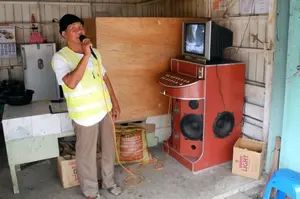
Where LaSing Karaoke shines: family nights, barkada sessions, barangay fiestas. Illustrative scenes from the Filipino videoke life.




Page 13 · Requests from the audience
FAQs
Q.Is LaSing Karaoke really free?
A.Yes, completely free. There is no subscription, no account signup, and no locked features. You download the app once and sing as much as you want.
Q.Does LaSing Karaoke work without internet?
A.Yes, that is its biggest strength. Once your song files are saved on the phone, the app plays everything offline. No WiFi or mobile data needed during your singing session.
Q.Where do I get songs for LaSing Karaoke?
A.You add your own karaoke files in MIDI, KAR, or MP3+G format. Filipino singers usually build their libraries from community song packs shared on forums, including large OPM collections. Copy the files into the LaSing folder and the app scans them automatically.
Q.Can I use LaSing Karaoke on my TV?
A.Yes. Mirror your phone screen to the TV with an HDMI adapter or wireless casting. Lyrics show big on the TV while you control the song list from your phone, just like a classic videoke setup.
Q.Can I change the key of a song?
A.Yes, the built-in key changer shifts any song up or down to match your vocal range. You can also adjust echo and reverb to get the videoke sound you like.
Q.Can I record my singing?
A.Yes, LaSing Karaoke can record your performances so you can replay them or share them with family and friends.
Q.Will it run on my old phone?
A.Very likely. The app needs only Android 6.0 and about 2 GB of RAM. It was tested on phones as old as the Galaxy A13 and runs smoothly.
Q.Is LaSing Karaoke on the Play Store?
A.No, it is distributed as an APK outside the Play Store. That is why you install it with the sideload steps on this page. The file here is signature-verified and malware-scanned.
Q.Is LaSing Karaoke safe to install?
A.The build on this page was installed on five real Android phones, scanned for malware, and signature-checked to confirm it is the original unmodified release.
Q.How much storage do my songs need?
A.Very little. MIDI karaoke files are tiny, so thousands of songs fit in a few hundred megabytes. Even a 32 GB phone holds a lifetime of kantahan material.
Encore · The final song
Final Verdict
LaSing Karaoke does one thing and does it well: it turns an Android phone into a dependable offline videoke machine. No subscriptions, no accounts, no internet needed once your songs are loaded. For Filipino households where singing together is a tradition rather than an event, that simplicity is exactly right.
You bring your own song files, which is both the strength and the homework. If you already have a MIDI or KAR collection, or you are willing to build one from community packs, LaSing Karaoke will serve your family for years on hardware you already own. The key changer, echo controls, and TV mirroring cover everything a real kantahan needs.
Get it if
you want free offline videoke, you have song files ready, and you sing with family or barkada.
Skip it if
you want a built-in streaming song catalog with zero setup.
LaSing Karaoke APK v2.1.0 for Android. Free offline karaoke player supporting MIDI, KAR, and MP3+G formats. This page is maintained by our review team and the download file is signature-verified before publishing. Reviewed by Ramon Torres.